Shared AI workplace for teams

Adopt AI agents

Run agents in a shared workplace with your team.
Chat with them, automate tasks, and review their work.

Join the waitlist

Runtite is in active development. Join the waitlist if you want to be notified when we launch.

🇪🇺 Built and hosted in the EU.

What is Runtite?

A platform where agents work with your team

Runtite is an agent workplace. Your team can create AI agents using any model provider (or your own self-hosted models) and interact with them to get work done.

Runtite allows your team to connect integrations, manage agent permissions centrally, and keep an audit trail of all agent activity.

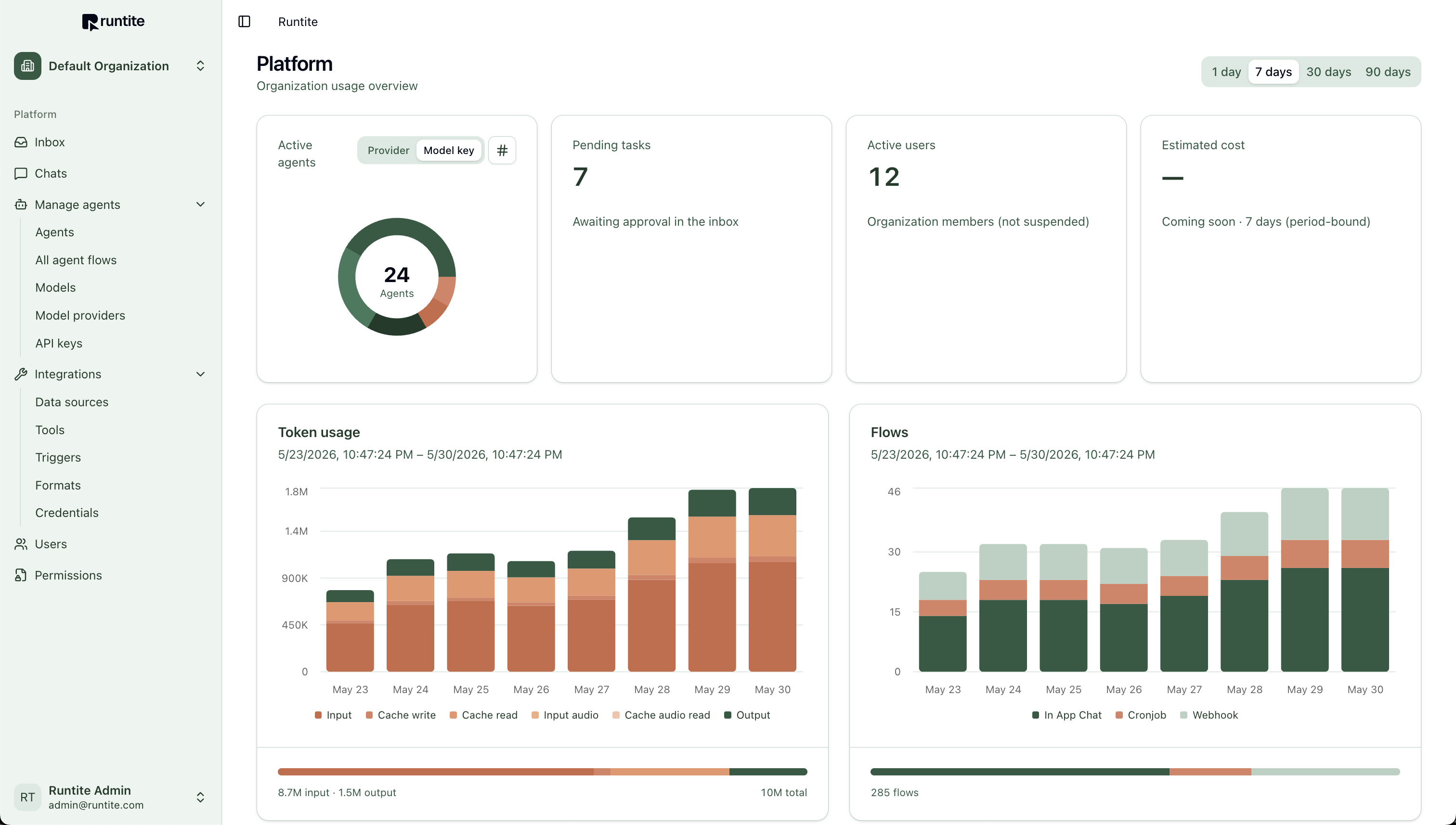
Runtite organization usage overview showing active agents, token usage, and flow analytics

Why Runtite?

What responsible AI adoption looks like

Without Runtite

  • Tooling is all over the place

    Every teammate picks their own apps. Data is fragmented, and you don't have a full picture of which tools are in use.

  • Lack of control over credentials

    One person grants Claude access to a Drive folder. Another lets Gemini send email. How can you control which providers have access to what? How do you rotate credentials?

  • You cannot enforce policies

    It falls under each user's responsibility to configure permission checks every time an agent accesses your data. As an organization, you cannot enforce policies centrally.

  • Making self-hosted AI useful is a lot of work

    You have sensitive data in your organization, and you'd like to run agents on it. However, setting up self-hosted AI, maintaining it, and offering the features your teammates expect is not worth the effort.

  • No shared visibility

    Agent runs happen in individual accounts. You cannot see what agents did, what they cost, or what needs a human review.
With Runtite

  • One workplace, any provider

    Use any model from any provider from the same interface. Switching models or providers is frictionless. Everyone works in the same platform.

  • Centralized credentials

    Connect Gmail, Google Calendar, and other integrations once per organization. Control which agents use which credentials, and rotate or revoke access when you need to.

  • Centralized permission checks

    Configure which integrations run automatically and which require approval. The permissions get applied to all your agents.

  • First-class support for self-hosted models

    Interact with self-hosted models with a rich chat UI, automations, and tool calling, from the same interface as any other model.

  • Audit trail and metrics

    Track your organization's usage and agent activity from one place. Keep a central record of all your agents' runs.

How it works

From zero to agent in minutes

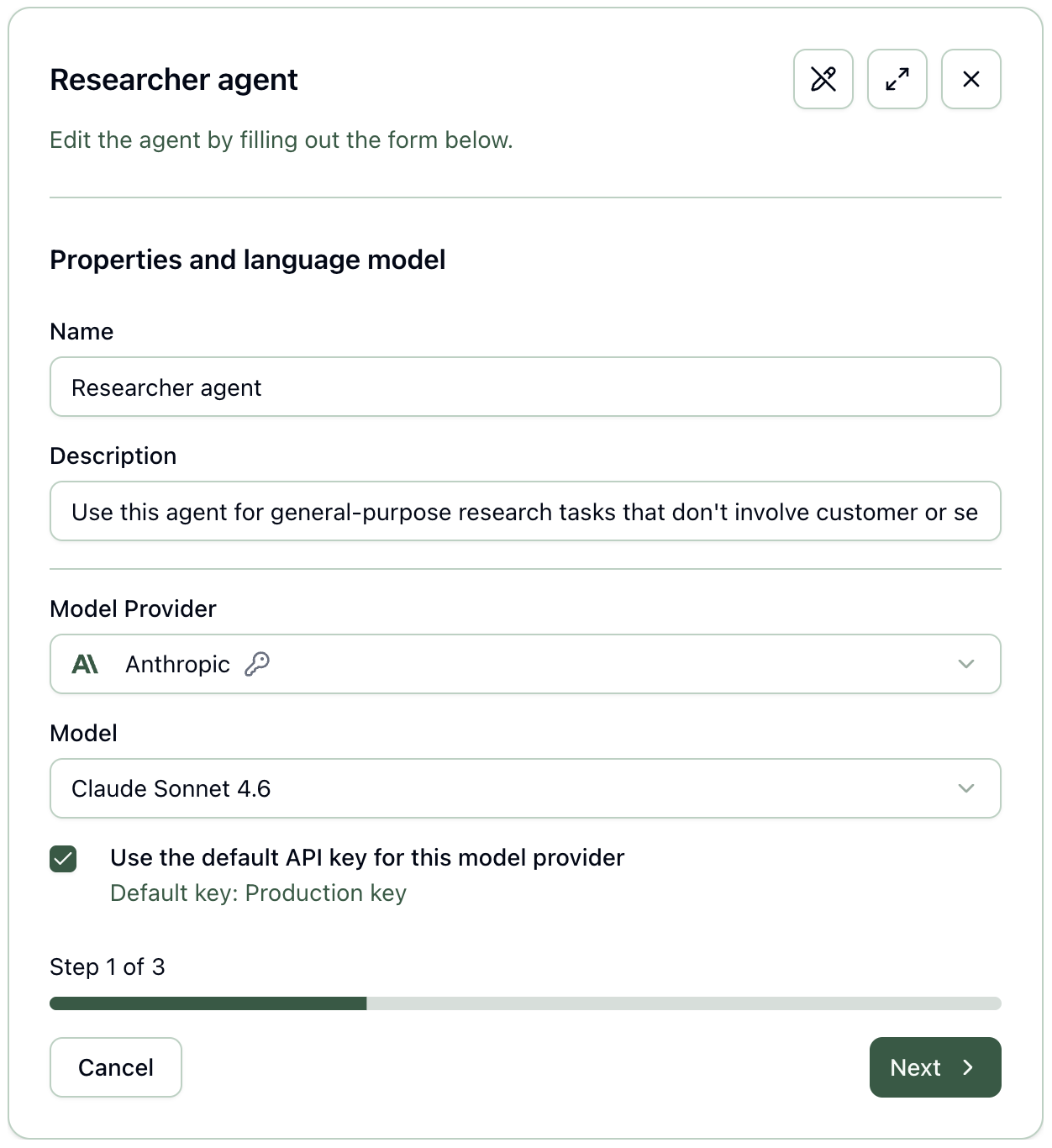
1. Create an agent

In Runtite, an agent is an AI model with capabilities, triggers, and instructions.
Start by selecting the model to use. The model determines the available integrations.

Runtite agent creation form with name, description, model provider, and step 1 of 3

General integrations

  • API endpointIntegrate with any API.
  • GmailSearch emails, make drafts, and send mail.
  • Google CalendarManage calendar events.

Provider built-in capabilities

Web search Fetch up-to-date information via the model provider's native search

Image generation Create visual assets

Code execution The model can generate code and run it in the provider's sandbox

MCP server Connect external tools through OpenAI and Anthropic MCP support

2. Connect integrations

Give capabilities to your agent. Enable any of our custom integrations, or the model provider's built-in capabilities.

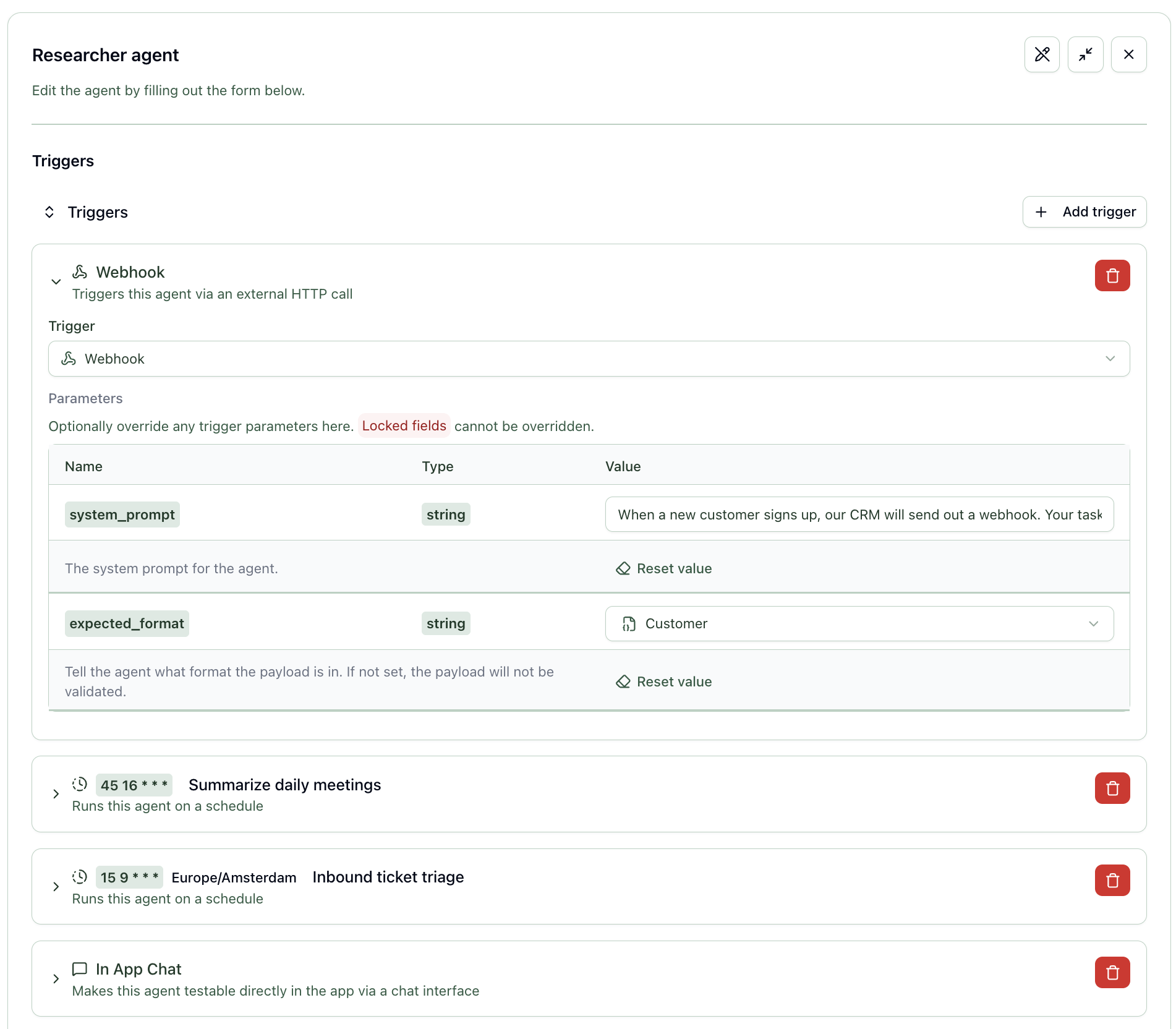
3. Add triggers

Make your agent available for your team to chat with, configure it to run on a schedule, or get a unique URL to trigger it on-demand.
You can give it different instructions for each of these triggers.

Runtite agent triggers configuration with webhook, scheduled jobs, and in-app chat

That's it!

A new agent has joined your team. You can chat with it, and review its work when it runs in the background.

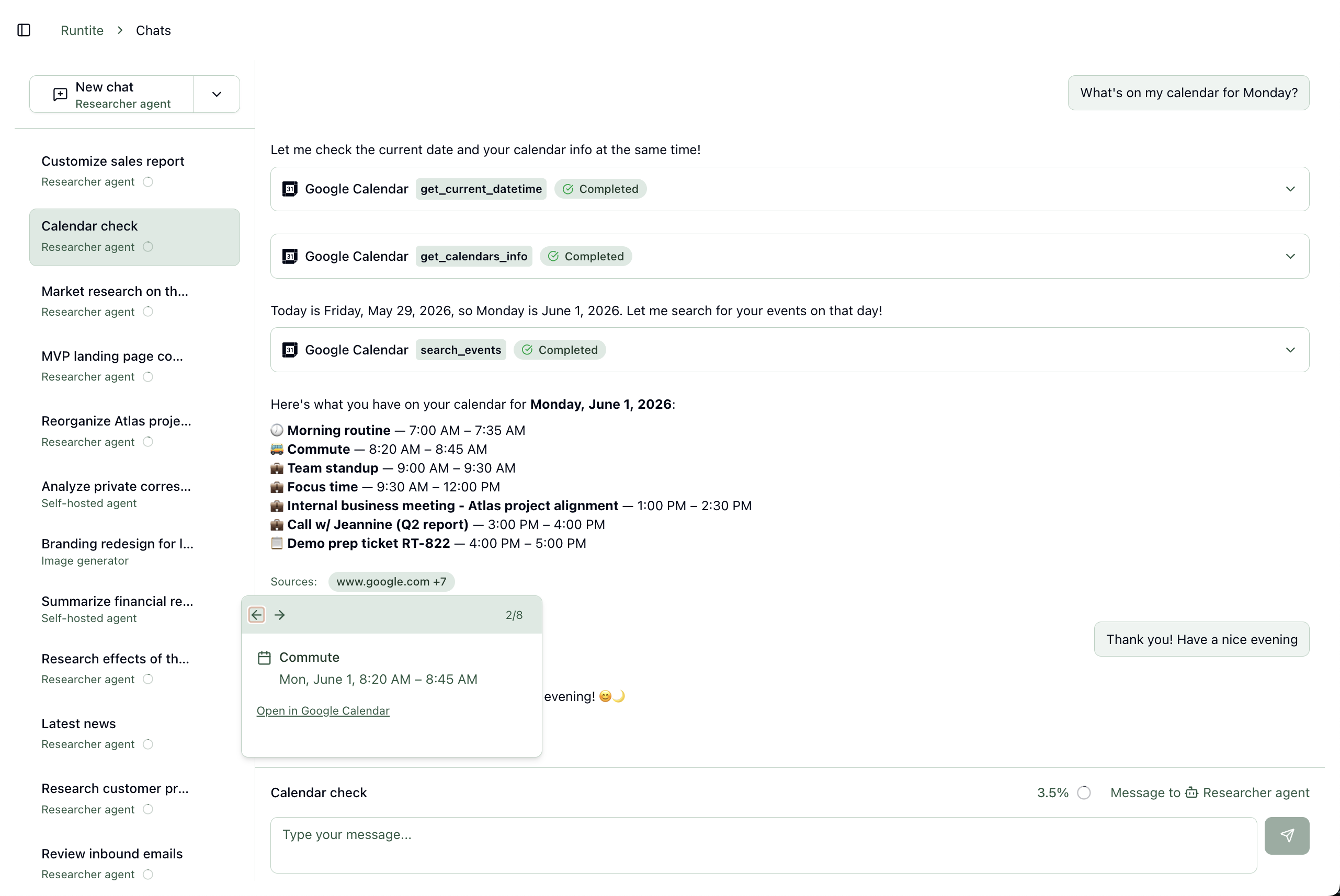
Chat with your agents

Use any AI model, commercial or self-hosted

Use the latest models from OpenAI, Anthropic, Google, and more,
or connect to your own self-hosted models with an OpenAI-compatible interface.

Runtite chat showing agent tool calls, calendar integration, and streaming conversation

Streaming conversations

Persistent chat history with files, images, and source citations.

Context at a glance

See how much of the model's context window a thread is using as it grows.

Decisions in the thread

Approve or deny agent actions without leaving the chat.

Trigger automations

Automate work in the background

Configure agents to run on a schedule, or trigger agents from external systems via webhooks.
The agent executes in the background and, if human approval is required, adds a task for your team to review.

On schedule Webhook ... More triggers coming soon

Each execution is recorded in an audit trail. See who did what when, and how much it cost.

Checks and balances

Quality over quantity

Current AI models are eager to generate a lot of output. But how do you control the quality of what's generated?
Runtite gives your team the tools to do so.

Human-in-the-loop approval

Centrally configure which integrations may run automatically or require approval.

When an action needs intervention, Runtite creates a task in the inbox. Your team can review it, and the agent will pick up where it left off.

Safety and monitoring

Setup credentials once, and stay in control of how AI models integrate with your organization's data.

Centralized credentials

Connect Gmail, Google Calendar, and other OAuth integrations once per organization.
You can centrally rotate or revoke them, and that will apply to all agents using them.
Runtite (and your agents) never see your passwords.

Usage dashboard

Track token usage, agent activity, flow volume by trigger type, pending approvals, and more.

Example breakdown

Clear pricing

You pay a flat fee to use Runtite (we don't charge per user). On top of that, you pay for your model usage.

You can bring your API keys to Runtite. We're working on offering managed credits for your convenience.

During Runtite's beta phase, you only pay for your model usage. The Runtite platform itself is free.

Use cases

Example workflows your team could set up in minutes

Inbound lead triage and follow-up drafts

Webhook or form submissions kick off an agent; your team reviews scored leads and drafts before the agent sends them a follow-up email.

Meeting prep from calendar context

Agents pull upcoming events from Google Calendar, scan related threads in Gmail, and draft a summary for your team before the call.

Post-meeting discussion summary

After a call, your team stores the meeting notes in your internal system. The agent then takes them, pulls context from the meeting invite, and drafts a summary that your team reviews before sending.

Account and prospect research briefs

Web search and uploaded notes become talking points your team verifies before outreach.

Weekly competitor or market pulse

Scheduled runs summarize changes on web search results; Marketing reviews the digest before sharing it internally.

Weekly team status digest

Scheduled agents send a digest to the team on what was worked on last week.

Support inquiry triage from Gmail

Agents classify incoming requests in your inbox, pull context from your APIs and web results, and propose responses. Your team reviews before the agent replies to your customers.

CRM updates through your APIs

Agents call your CRM's endpoints to log notes or update records after a customer event happens.

Triage new Sentry bugs

New Jira or Sentry bugs trigger an agent. It gathers context from the Sentry issue, Jira and your code repo, and writes a comment to the ticket with an initial assessment.

FAQ

Frequently asked questions

Join the waitlist to get notified when we launch

Runtite is in active development. We will send you an email when we open up the private beta.